Domino Replication Without a Shared Replica ID
Classic Domino replication is highly reliable — as long as your databases are true replicas. But what happens during migrations, archiving or integration projects where databases are intentionally independent?
The real question is not simply: “How do I replicate this database?”
The real question is: “How do I synchronize selected Domino documents between independent NSF databases in a controlled, traceable, repeatable and highly efficient way?”
Not Every Synchronization Scenario Is Classic Replication
Domino replication is built around the concept of databases being replicas of each other. That is exactly what makes it so powerful — but also what limits its use when databases are intentionally independent.
Typical examples are migration databases, archive databases, reporting databases, customer-specific target applications or newly designed Domino applications that still need to receive selected data from an older NSF.
- different Replica IDs
- different database designs
- different field structures
- different business purposes
- selective transfer instead of complete database replication
- repeatable synchronization instead of one-time copy operations
Where Non-Replica-ID Synchronization Becomes Relevant
This type of controlled synchronization is especially useful when Domino databases need to exchange data, but are not intended to become classical replicas of each other.
Where Copy Agents and Export/Import Routines Become Difficult
Of course, there are other ways to move data: LotusScript agents, Java agents, export/import processes, copy routines or custom migration scripts. These approaches can work, but they often become difficult when the requirements go beyond a simple one-time copy.
- selecting only specific documents based on business rules
- synchronizing changes repeatedly, not just once
- handling created, updated and deleted documents
- preserving or transforming fields during transfer
- handling document links, view links or database links
- traceable result logs and error statistics
- controlled processing rules per database direction
- performance that remains practical for large data volumes
- repeatable execution for migration or integration workflows
- clear separation between product logic and project rules
Controlled Synchronization with the Domino API Engine
The Domino API Engine can synchronize documents between Domino databases even if the databases are not classical replicas of each other. The synchronization can be controlled by Notes-compatible selection formulas, rights and processing flags.
The goal is not to replace standard Domino replication where standard replication is the right tool. The goal is to handle the cases where Domino databases need to exchange data, but are not replicas — and where the process must remain selective, transparent and controllable.
- migration from an old NSF structure to a new Domino application
- selective synchronization into archive or reporting databases
- transferring only certain forms, categories or business states
- synchronizing Domino databases with different Replica IDs
- controlled data distribution between related but independent applications
- one master database and several independent satellite databases
- traceability through result and error statistics
Selective Synchronization Between Independent NSF Databases
The following simplified example illustrates the basic idea. The exact script depends on the database paths, selection logic, rights and required processing flags. Depending on the configured rights for each database, the synchronization can include creations, updates and deletions in either direction.
SrcDBh := @OpenDB("apps\\source.nsf");
DstDBh := @OpenDB("apps\\target.nsf");

SelectionFormula := "Form = \"Customer\" & Status = \"Active\"";

/* Example: define replication rights */
Rights := @BitVektor(1:2:3:4):@BitVektor(1:2:3:4);

/* Selective synchronization between independent Domino databases */
Result := @ReplicateWithFormula(
    SrcDBh;
    DstDBh;
    SelectionFormula;
    Rights
);

@LogReport(Result);

SrcDBh := @CloseDB(SrcDBh);
DstDBh := @CloseDB(DstDBh);
This is not meant to be a replacement for a full project script. In real-world scenarios, the script would usually include logging, error handling, configuration documents, formulas per direction, result statistics and project-specific processing rules.
More Advanced Replication Scenarios
The example above shows a relatively simple synchronization scenario. In real-world Domino projects, replication requirements are often more complex.
Some databases need to synchronize documents while protecting selected fields from being overwritten. Other scenarios require formula-based selection combined with field protection, or controlled replacement logic for documents that must be pushed into another structure.
- @ReplicateWithFieldProtection for synchronization where selected fields must remain local to one database
- @ReplicateWithFormulaWithFieldProtection for formula-controlled synchronization with protected field sets
- @PushAndReplace for controlled push-and-replace scenarios
- project-specific replication logic implemented as a custom Engine task or custom @Function
Starting the Included Replication Example
The evaluation package includes a sample script and matching Domino test databases for this replication scenario. To run the example, download the evaluation package and install the Engine as described in the included README file.
- Download and unpack the Domino API Engine evaluation package.
- Install and configure the Engine as described in the README file.
- Place the included sample databases in the TEST directory below the Domino server data root.
- If the databases are stored in a different location, adjust the sample script accordingly.
- Check and adjust the database ACLs if required.
- Open the Engine Control database.
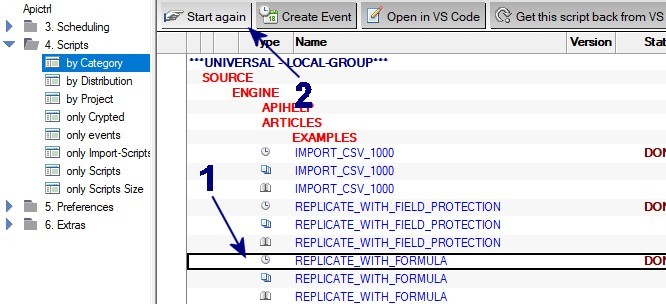
- In the view 4. Scripts\by Category, select the event document for the script REPLICATE_WITH_FORMULA.
- Click the action button Start again.